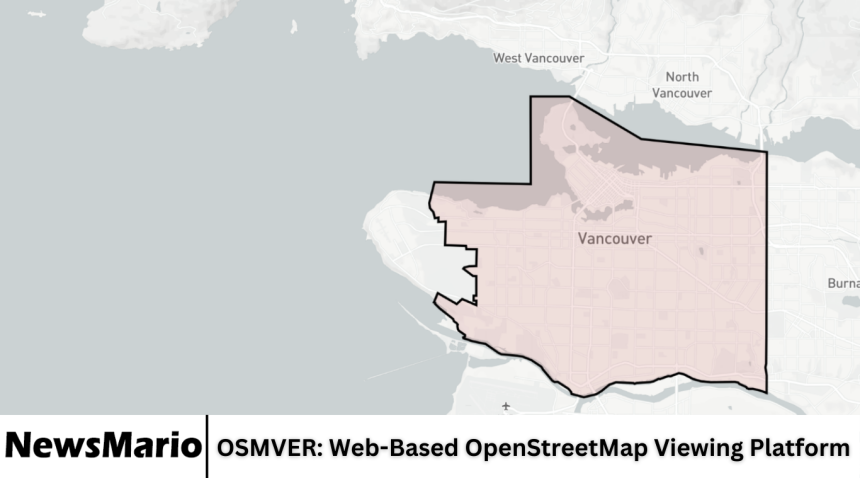
OSMVER is a web-based platform that provides users with an easy and interactive way to view OpenStreetMap data. OpenStreetMap (OSM) is a collaborative project that creates a free, editable map of the world, and OSMVER makes this information accessible to anyone via a web browser.
With increasing reliance on digital maps for navigation, planning, and research, platforms like OSMVER play an important role in delivering accurate, real-time mapping data in a user-friendly interface. This article offers a comprehensive review of OSMVER, exploring its features, usability, performance, and overall value for users of all levels.
Overview of OSMVER
OSMVER is designed to allow users to explore OpenStreetMap data without the need for complex software or downloads. It focuses on delivering an intuitive experience where users can zoom, pan, and search for locations, streets, and landmarks. The platform provides an interactive interface that works on both desktop and mobile devices, making it accessible for casual users, developers, and researchers alike.
The platform emphasizes simplicity while maintaining the depth of information available in OpenStreetMap. This combination allows users to efficiently access geographic information for various personal, educational, or professional needs.
Key Features
OSMVER offers a range of features that make it stand out as an online mapping tool:
- Interactive Maps: Users can zoom in and out, pan across regions, and explore streets, landmarks, and natural features.
- Search Functionality: Users can search for specific locations, addresses, or points of interest quickly.
- Layer Options: The platform provides multiple map layers, including standard, satellite, and terrain views.
- Marker and Highlight Tools: Users can highlight areas, add markers, or draw boundaries for better visualization.
- Data Export Options: Some features allow users to export map data for further analysis or use in projects.
- Mobile-Friendly Interface: OSMVER works smoothly on smartphones and tablets, offering the same functionality as the desktop version.
- Customizable Views: Users can adjust map styles and display settings according to their preferences.
These features make OSMVER a practical tool for casual exploration, academic research, and even professional mapping tasks.
Ease of Use
One of the strongest aspects of OSMVER is its user-friendly interface. The platform is designed so that even beginners with no mapping experience can navigate it easily. Menus are straightforward, and all essential functions are accessible from the main interface. Tools like zoom, pan, and search are intuitive, requiring no prior knowledge of geographic information systems (GIS).
Additionally, OSMVER provides tooltips and on-screen guidance, helping new users quickly understand how to use various features.
Performance and Speed
OSMVER is optimized for fast performance. Maps load quickly, and interactions like zooming, panning, and switching layers are smooth. The platform efficiently handles large amounts of map data, ensuring a responsive experience even when exploring densely populated areas or detailed street maps.
The speed and reliability of OSMVER make it a dependable option for users who require real-time access to geographic data without delays.
Accuracy and Data Reliability
The platform uses OpenStreetMap data, which is crowd-sourced from contributors worldwide. This collaborative approach ensures that maps are updated regularly and reflect changes in roads, buildings, and landmarks. While OSM data may occasionally have minor inaccuracies due to its open-source nature, OSMVER provides a reliable representation of geographic information for most everyday and professional uses.
The platform’s use of up-to-date data enhances its credibility and usefulness for planning, navigation, and research.
Compatibility and Accessibility
OSMVER is compatible with all modern web browsers, including Chrome, Firefox, Safari, and Edge. Its responsive design ensures that content displays correctly on devices of all sizes, from large desktop monitors to smartphones and tablets.
The platform’s accessibility features, combined with a simple interface, make it suitable for users of all skill levels and geographic locations.
Applications of OSMVER
OSMVER can be used for a variety of purposes:
- Navigation and Travel Planning: Users can explore routes, streets, and landmarks to plan trips effectively.
- Academic Research: Students and researchers can analyze geographic data for projects and reports.
- Urban Planning and Development: Professionals can use the platform to visualize infrastructure, population distribution, and land use.
- Outdoor Activities: Hikers, cyclists, and travelers can explore terrain and natural features before trips.
- Emergency Planning: Organizations can use maps to identify key locations for disaster management or public safety planning.
The versatility of OSMVER allows it to meet the needs of a wide audience with diverse interests.
Comparison with Other Mapping Platforms
Compared to other web-based mapping platforms like Google Maps or Bing Maps, OSMVER provides the advantage of open-source data, which can be freely accessed and modified. While platforms like Google Maps offer extensive features and commercial tools, OSMVER emphasizes simplicity, user control, and accessibility without subscription fees or usage restrictions.
OSMVER is particularly appealing to those who value open data and customizable mapping options over commercial limitations.
Strengths of OSMVER
OSMVER has several key strengths:
- Intuitive and user-friendly interface.
- Fast loading and responsive map interactions.
- Reliable access to real-time OpenStreetMap data.
- Compatibility with desktop and mobile devices.
- Free and open-source approach that promotes accessibility.
- Customizable map views and layers.
These strengths make OSMVER an effective tool for casual and professional users alike.
Areas for Improvement
Despite its strong performance, OSMVER could enhance its platform with additional features:
- Integration of advanced GIS tools for professional users.
- Enhanced data visualization options, including heatmaps and overlays.
- Offline map access for users in areas with limited internet connectivity.
- Inclusion of user-generated notes or collaboration tools for group projects.
Adding these features would improve the versatility and appeal of OSMVER, especially for advanced users.
User Experience
The overall user experience of OSMVER is highly positive. Users appreciate the simplicity of navigation, the clarity of map displays, and the speed of interaction. Both beginners and experienced users find the platform effective for accessing and exploring geographic data without technical barriers.
The minimalistic design ensures that users can focus on maps and data without unnecessary distractions, making the experience straightforward and enjoyable.
Security and Privacy
OSMVER primarily serves map data and does not require extensive personal information from users. The platform uses standard security protocols to ensure safe browsing and secure connections. Since it relies on publicly available OpenStreetMap data, users can access information confidently without privacy concerns.
Who Should Use OSMVER
OSMVER is suitable for a wide range of users, including:
- Students and researchers needing geographic data.
- Travelers and outdoor enthusiasts planning routes or trips.
- Professionals in urban planning or environmental studies.
- Individuals exploring mapping for personal interest or hobby.
- Organizations requiring quick access to open-source map data.
The platform’s accessibility, speed, and ease of use make it a versatile option for almost any user interested in maps.
Frequently Asked Questions
What is OSMVER?
OSMVER is a web-based platform that allows users to view, explore, and interact with OpenStreetMap data easily.
Is OSMVER free to use?
Yes, OSMVER provides free access to OpenStreetMap data through its online platform.
Can I use OSMVER on my smartphone?
Yes, OSMVER is mobile-friendly and works on smartphones, tablets, and desktops with full functionality.
How accurate is the data on OSMVER?
The platform uses OpenStreetMap data, which is regularly updated by contributors worldwide. It is generally accurate for most applications, though minor discrepancies may occur.
Can I export map data from OSMVER?
Some features allow users to export data for personal or research purposes, depending on the tools provided on the platform.
Conclusion
OSMVER is a powerful and accessible web-based platform for exploring OpenStreetMap data. Its intuitive interface, fast performance, and compatibility with multiple devices make it suitable for both casual users and professionals. While there is potential for advanced features such as GIS tools, offline access, and enhanced visualization, OSMVER already provides reliable, open-source mapping in a user-friendly environment. For anyone seeking a simple yet effective way to interact with maps, OSMVER is a practical and valuable platform.